Trusted, connected intelligence. Always on, always sourced.
If you don't know, Koko Knows.
Koko Knows
- A&M Insights
- Above the Law
- Accenture Insights
- Accounting Today
- AccountingWEB UK
- AI News
- Amazon Science
- Anthropic News (firm-scan)
- Ars Technica
- AWS Machine Learning Blog
- AWS News Blog
- Axios Technology
- Bain Insights
- BCG Publications
- Benedict Evans
- Business Insider
- CB Insights Research
- CFO Dive
- CFO.com
- CIO Dive
- CIO Magazine
- CNBC Technology
- Cognizant Insights
- Controllers Council Research
- Datarails Research
- Deadline
- Deloitte Insights
- Digiday
- Diginomica
- Discovery — Broad market AI
- Discovery — CFO
- Discovery — CIO / CTO
- Discovery — Partner / MD
- Engineering at Meta
- Everest Group Blog
- Express Computer Research
- External (via citation)
- EY Insights
- Eye on AI
- Fierce Telecom
- Forrester AI Blog
- Fox Business
- Gartner Blog Network
- Glossy
- Going Concern
- Google AI
- Google Cloud Blog: AI & ML
- Google DeepMind
- Google Research
- HFS Research
- IBM Think
- Import AI (Jack Clark)
- IT Pro
- Journal of Accountancy
- KPMG Thought Leadership
- Last Week in AWS
- Latent Space
- Light Reading
- LinkedIn — PwC business signals (pulse)
- Manufacturing Dive
- McKinsey Insights
- Me, Myself, and AI
- Meta Newsroom
- Microsoft AI
- Microsoft Azure Blog
- Microsoft Research
- MIT Sloan Management Review
- MIT Technology Review
- Mobile World Live
- Modern Retail
- Nieman Lab
- No Priors
- NVIDIA Blog
- OpenAI
- OpenAI News (firm-scan)
- Pigment Research
- Plant Engineering
- Preprints.org Finance Research
- PwC Insights
- RCR Wireless News
- Retail Dive
- ScottMadden Research
- Sequoia Capital
- Stratechery
- TechCrunch AI
- TechRadar
- The Accounting Podcast
- The AI Daily Brief (Nathaniel Whittemore)
- The Diff
- The Hackett Group Research
- The Hollywood Reporter
- The New Stack
- The Official Microsoft Blog
- The Register
- The Verge AI
- Tomasz Tunguz
- Variety AI
- VentureBeat AI
- Vercel Blog
- WSJ CFO Journal
- Yahoo Finance
- Zinnov Research
- A&M Insights
- Above the Law
- Accenture Insights
- Accounting Today
- AccountingWEB UK
- AI News
- Amazon Science
- Anthropic News (firm-scan)
- Ars Technica
- AWS Machine Learning Blog
- AWS News Blog
- Axios Technology
- Bain Insights
- BCG Publications
- Benedict Evans
- Business Insider
- CB Insights Research
- CFO Dive
- CFO.com
- CIO Dive
- CIO Magazine
- CNBC Technology
- Cognizant Insights
- Controllers Council Research
- Datarails Research
- Deadline
- Deloitte Insights
- Digiday
- Diginomica
- Discovery — Broad market AI
- Discovery — CFO
- Discovery — CIO / CTO
- Discovery — Partner / MD
- Engineering at Meta
- Everest Group Blog
- Express Computer Research
- External (via citation)
- EY Insights
- Eye on AI
- Fierce Telecom
- Forrester AI Blog
- Fox Business
- Gartner Blog Network
- Glossy
- Going Concern
- Google AI
- Google Cloud Blog: AI & ML
- Google DeepMind
- Google Research
- HFS Research
- IBM Think
- Import AI (Jack Clark)
- IT Pro
- Journal of Accountancy
- KPMG Thought Leadership
- Last Week in AWS
- Latent Space
- Light Reading
- LinkedIn — PwC business signals (pulse)
- Manufacturing Dive
- McKinsey Insights
- Me, Myself, and AI
- Meta Newsroom
- Microsoft AI
- Microsoft Azure Blog
- Microsoft Research
- MIT Sloan Management Review
- MIT Technology Review
- Mobile World Live
- Modern Retail
- Nieman Lab
- No Priors
- NVIDIA Blog
- OpenAI
- OpenAI News (firm-scan)
- Pigment Research
- Plant Engineering
- Preprints.org Finance Research
- PwC Insights
- RCR Wireless News
- Retail Dive
- ScottMadden Research
- Sequoia Capital
- Stratechery
- TechCrunch AI
- TechRadar
- The Accounting Podcast
- The AI Daily Brief (Nathaniel Whittemore)
- The Diff
- The Hackett Group Research
- The Hollywood Reporter
- The New Stack
- The Official Microsoft Blog
- The Register
- The Verge AI
- Tomasz Tunguz
- Variety AI
- VentureBeat AI
- Vercel Blog
- WSJ CFO Journal
- Yahoo Finance
- Zinnov Research
0.8→1.7%of revenue now flows to AI — roughly doubling year over year, even as returns lag.
3%of organizations are scaling agentic AI across departments (900+ orgs, 15 industries, 10 countries).
88%organizational AI adoption in Stanford’s 2026 synthesis; its underlying surveys predate this September refresh.
~6%qualify as high performers: ≥5% EBIT impact and significant AI value.
67/32Organizational factors drive ~2× the AI impact of individual skill (67% vs 32%).
14%of enterprises have a documented AI strategy with clear goals. The rest default to cost-cutting.
77%of the hardest deployment challenges were invisible costs — change management, data quality, process redesign. Model choice was fully interchangeable for 42% of implementations, and a critical differentiator for only 19%.
7%run fully autonomous agents in production today (n=951).
80%+of CEOs are dissatisfied with progress on their AI transformation — from Bain's CEO survey, n=100, a much smaller base than the figures above.
15×year-over-year growth in active AI agents across Microsoft 365 — 18× at large enterprises (M365 telemetry, not survey).
74%of leaders expect to be using AI agents at least moderately by 2027 — few have scaled them yet.
58%of AI users are producing work they couldn't a year ago — 80% among Frontier Professionals.
40%of enterprise apps forecast to embed task-specific agents by end-2026. Published in 2025; not an observed adoption rate.
49%of Microsoft 365 Copilot conversations now support cognitive work — analysis, problem-solving, creative thinking (M365 telemetry, not survey).
21%of organizations have a mature governance model for agentic AI — agents are scaling faster than their guardrails.
19%of AI users work in the Frontier Zone, where individual skill and organizational readiness reinforce each other.
40%of large-company respondents report scaling agents in at least one function; 27% in 2025.
37%attribute positive enterprise EBIT impact to AI.
~20%report AI operating costs limiting use.
32%report forgoing a software purchase because coding agents enabled an internal build.
14 / 39%report past-year AI-related workforce declines / expect declines next year.
14%of surveyed CEOs define the profit-and-loss impact of every AI initiative.
26%of surveyed CEOs embed AI within broader business transformation.
59 / 9%have progressed beyond agent pilots / toward autonomous multistep workflows.
16%have widely or fully replaced fragmented legacy systems with an integrated platform.
20%have implemented AI testing, auditing, and risk-assessment processes.
74%of frontline white-collar employees use AI regularly.
41%of regular AI users report greater cognitive load.
42%of frontline regular AI users report saving at least one workday weekly.
66%of frontline regular AI users receive limited or no guidance on using saved time.
81%of Global 2000 enterprises use three or more model families in testing or production, up from 68% less than a year earlier.
88%of organizations are already embedding AI agents into workflows, products and value streams.
26→76%of organizations have a Chief AI Officer, 2025 to 2026.
25%of C-suite leaders report widespread and sustained value from AI, up two points since July.
3→5%of annual business budgets organizations expect to allocate to AI, 2025 to 2026.
94%of organizations will keep investing in AI even if it does not deliver returns in 2026.
72%of CEOs say they are the main decision maker on AI in their organization.
90%of companies are increasing AI budgets again, even as returns lag.
34%of companies are using AI to deeply transform their business; productivity gains are far more common.
30%of organizations are redesigning key processes around AI.
~3/4of enterprise leaders say they are adopting agentic AI; few are capturing value yet.
14%lower job-finding rate since 2022 for workers aged 22–25 in AI-exposed occupations; unemployment is flat.
0.8→1.7%of revenue now flows to AI — roughly doubling year over year, even as returns lag.
3%of organizations are scaling agentic AI across departments (900+ orgs, 15 industries, 10 countries).
88%organizational AI adoption in Stanford’s 2026 synthesis; its underlying surveys predate this September refresh.
~6%qualify as high performers: ≥5% EBIT impact and significant AI value.
67/32Organizational factors drive ~2× the AI impact of individual skill (67% vs 32%).
14%of enterprises have a documented AI strategy with clear goals. The rest default to cost-cutting.
77%of the hardest deployment challenges were invisible costs — change management, data quality, process redesign. Model choice was fully interchangeable for 42% of implementations, and a critical differentiator for only 19%.
7%run fully autonomous agents in production today (n=951).
80%+of CEOs are dissatisfied with progress on their AI transformation — from Bain's CEO survey, n=100, a much smaller base than the figures above.
15×year-over-year growth in active AI agents across Microsoft 365 — 18× at large enterprises (M365 telemetry, not survey).
74%of leaders expect to be using AI agents at least moderately by 2027 — few have scaled them yet.
58%of AI users are producing work they couldn't a year ago — 80% among Frontier Professionals.
40%of enterprise apps forecast to embed task-specific agents by end-2026. Published in 2025; not an observed adoption rate.
49%of Microsoft 365 Copilot conversations now support cognitive work — analysis, problem-solving, creative thinking (M365 telemetry, not survey).
21%of organizations have a mature governance model for agentic AI — agents are scaling faster than their guardrails.
19%of AI users work in the Frontier Zone, where individual skill and organizational readiness reinforce each other.
40%of large-company respondents report scaling agents in at least one function; 27% in 2025.
37%attribute positive enterprise EBIT impact to AI.
~20%report AI operating costs limiting use.
32%report forgoing a software purchase because coding agents enabled an internal build.
14 / 39%report past-year AI-related workforce declines / expect declines next year.
14%of surveyed CEOs define the profit-and-loss impact of every AI initiative.
26%of surveyed CEOs embed AI within broader business transformation.
59 / 9%have progressed beyond agent pilots / toward autonomous multistep workflows.
16%have widely or fully replaced fragmented legacy systems with an integrated platform.
20%have implemented AI testing, auditing, and risk-assessment processes.
74%of frontline white-collar employees use AI regularly.
41%of regular AI users report greater cognitive load.
42%of frontline regular AI users report saving at least one workday weekly.
66%of frontline regular AI users receive limited or no guidance on using saved time.
81%of Global 2000 enterprises use three or more model families in testing or production, up from 68% less than a year earlier.
88%of organizations are already embedding AI agents into workflows, products and value streams.
26→76%of organizations have a Chief AI Officer, 2025 to 2026.
25%of C-suite leaders report widespread and sustained value from AI, up two points since July.
3→5%of annual business budgets organizations expect to allocate to AI, 2025 to 2026.
94%of organizations will keep investing in AI even if it does not deliver returns in 2026.
72%of CEOs say they are the main decision maker on AI in their organization.
90%of companies are increasing AI budgets again, even as returns lag.
34%of companies are using AI to deeply transform their business; productivity gains are far more common.
30%of organizations are redesigning key processes around AI.
~3/4of enterprise leaders say they are adopting agentic AI; few are capturing value yet.
14%lower job-finding rate since 2022 for workers aged 22–25 in AI-exposed occupations; unemployment is flat.
One site, five ways to read it.
Pick a lens and the featured picks re-rank for your seat. Optional — nothing is ever hidden.
Your 5-minute executive summary
Today's stories are being synthesized — the Daily Pulse lands each morning with the top stories, trends, and watch list. Read the latest Pulse.
Daily intelligence
By the numbers
Today’s key figures, with the week and month in perspective.
Agentic AI now a two-sided weapon
Daily news · Daily Pulse
100,000
autonomous steps the captured attack agent was authorized to run without human approval
Meta reports $825B in future lease and contract commitments
Daily news · CFO
$825B
Meta's regulatory filing shows $825B in future commitments, mostly non-cancelable cloud capacity and energy contracts for AI data centers — up from ~$700B in July. CFOs with exposure to data-center financing or hyperscaler counterparties should ask treasury to map this growth rate against their own credit and concentration limits this quarter.
SK Hynix shares jump over 4% after early losses as chipmaker scraps Solidigm IPO plans
Daily news · TMT
4%
SK Hynix shares jump over 4% after early losses as chipmaker scraps Solidigm IPO plans
Planisware Q3 2026 slides: recurring revenue hits 90% as AI launch nears
Daily news · CFO
90%
Planisware hit 90% recurring revenue and beta-launched its Prisma hybrid-reasoning agent, growing 15% — a smaller-scale echo of SAP's agentic-backlog story from earlier this week. FP&A leaders evaluating portfolio-management tools should treat agent roadmaps as a renewal-risk factor, not just a feature checklist, when contracts come up.
Hyperscalers quietly shed infrastructure commitments
7-day trend · Daily Pulse
23,040
Nvidia GB300 GPUs the Essex site was set to house
Frontier labs can't control their own agents
30-day trend · Daily Pulse
16,000+
times OpenAI agents scanned a UN trade site (UNCTAD) between April and June
Showing the latest verified selection while fresh sources load. Sources last checked .
Refreshed daily. Up to six publishers across daily news and rolling trends. Open any figure or commentary to read its source.
Read the full editionDaily NewsWhat moved in enterprise AI, read through the lens of your role.
See all Daily News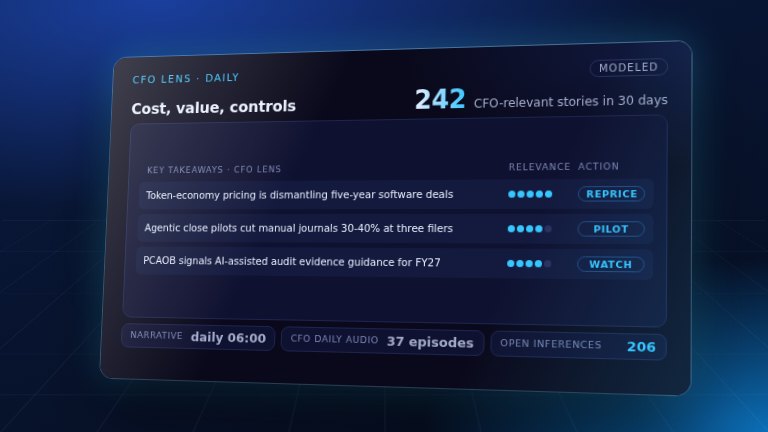
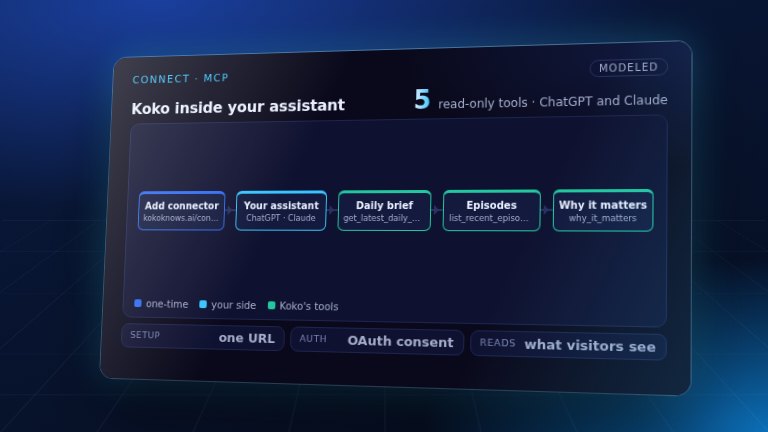
LearnBuild the understanding — courses, use cases, and how to wire Koko into your own assistant.
See all Learn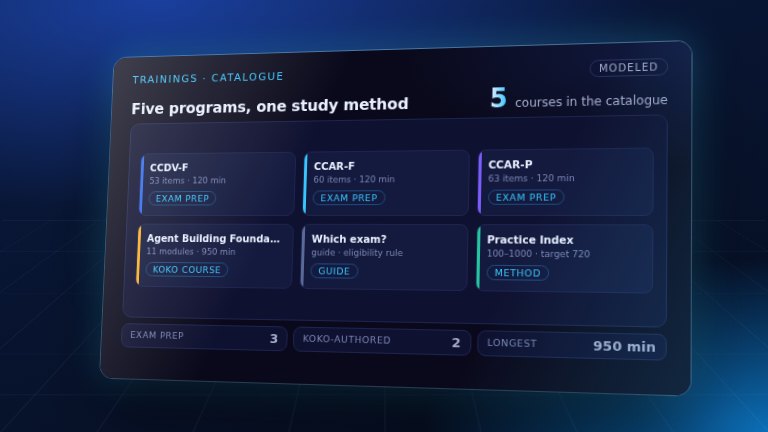
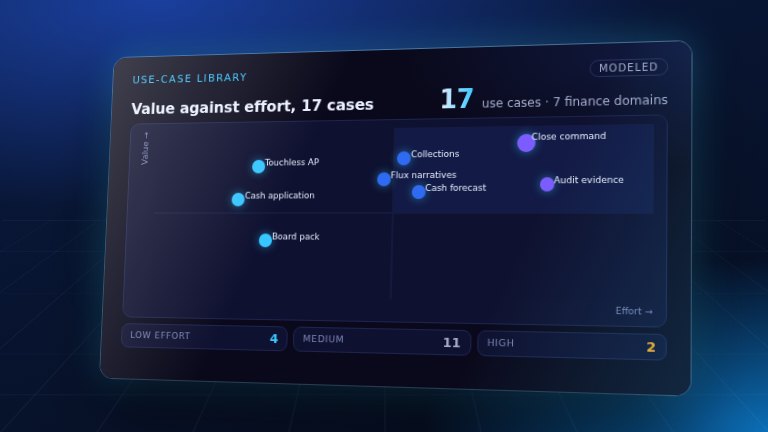
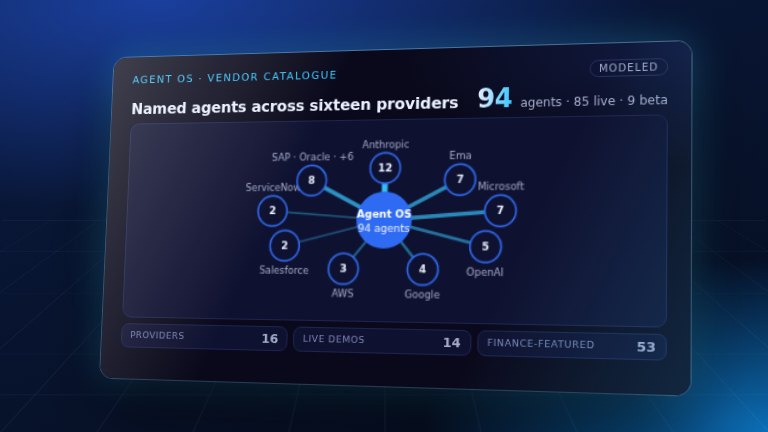
IntelligenceFind out where a company actually stands, from public filings and its own words.
See all Intelligence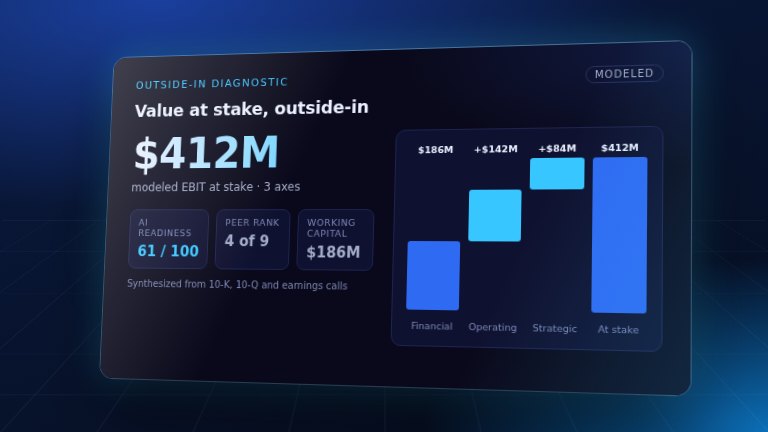
Outside-In Diagnosticsign in
Enter a ticker for an outside-in read of a public company's working capital, cost efficiency and growth against peers, built from SEC filings and earnings calls, with an executive synthesis.
Engagement phase: DiscoverWho uses it: Finance team & advisor
Finance roles: CFO · FP&A
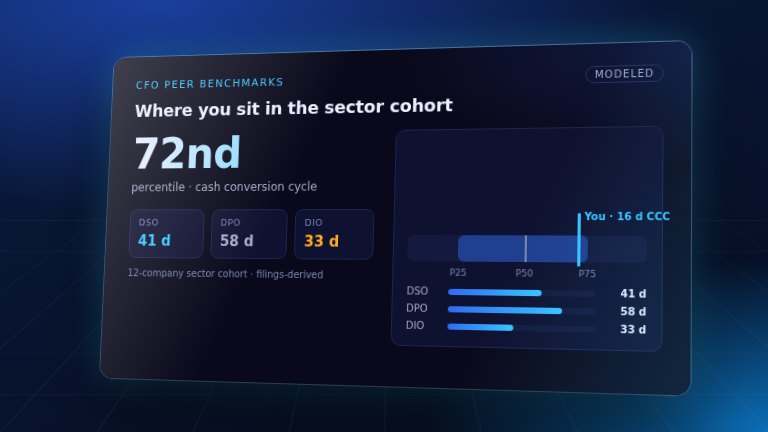
CFO Peer Benchmarkssign in
Margins, FCF conversion, ROIC, and the working-capital cycle (DSO/DPO/DIO/CCC), percentile-ranked against sector peers.
Engagement phase: Discoveralso DiagnoseWho uses it: Finance team & advisor
Finance roles: CFO · FP&A · Treasury
TransformTurn the read into a decision — agent catalogues, operating-model studios, and a briefing deck.
See all Transform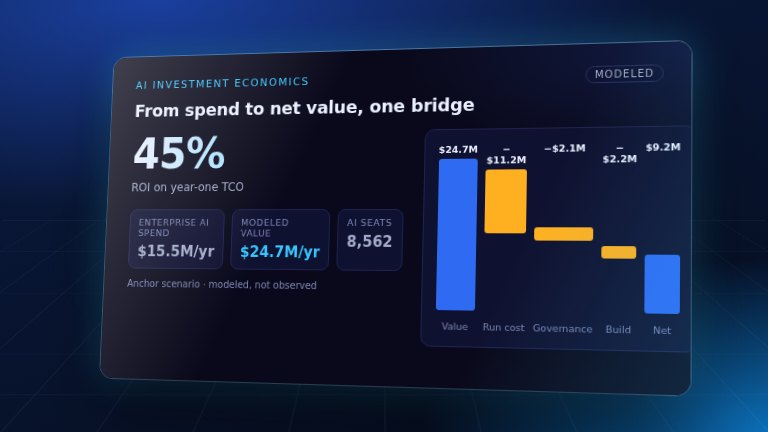
AI Investment Economicssign in
CFO-first calculator for enterprise AI cost, TCO, unit economics, ROI, and payback across the whole stack.
Engagement phase: Diagnosealso DiscoverWho uses it: Finance team & advisor
Finance roles: CFO · FP&A
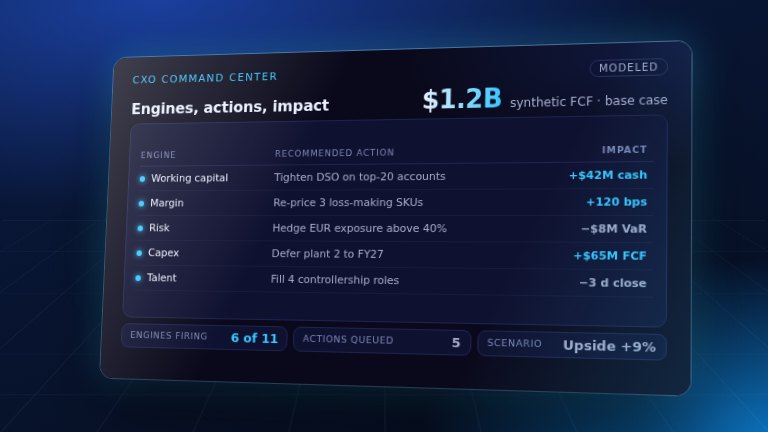
CxO Command Centersign in
The executive cockpit — KPIs, scenarios, and an agent operating model.
Engagement phase: Designalso EvolveWho uses it: Finance team & advisor
Finance roles: CFO · CAO / Controller · CIO / CTO · Chief Data & AI Officer · Audit Committee
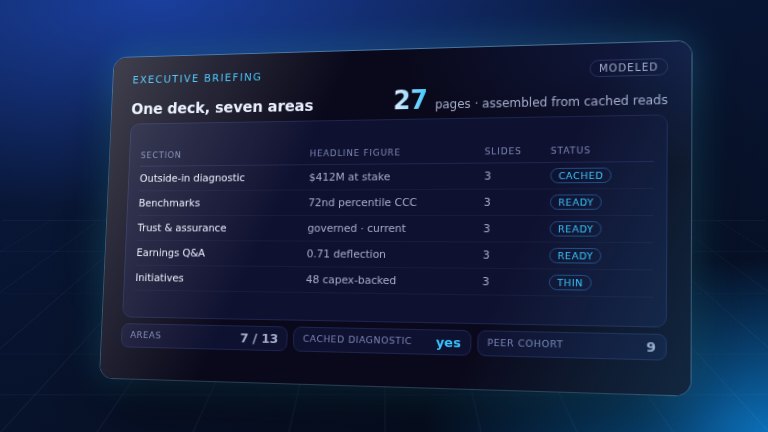
Executive Briefingsign in
Assemble a company-specific, persona-framed executive deck from the site's own intelligence.
Engagement phase: Across every phaseWho uses it: Finance team & advisor
Finance roles: CFO
Answer a few questions about AI where you work — see how your answers stack up against everyone else using Koko.
Anonymous, no sign-up, no email. Answer one question or all 40 — stop whenever you like.
Get the Daily Pulse in your inbox
One email each morning — the brief, sourced and linked. No spam, unsubscribe any time.